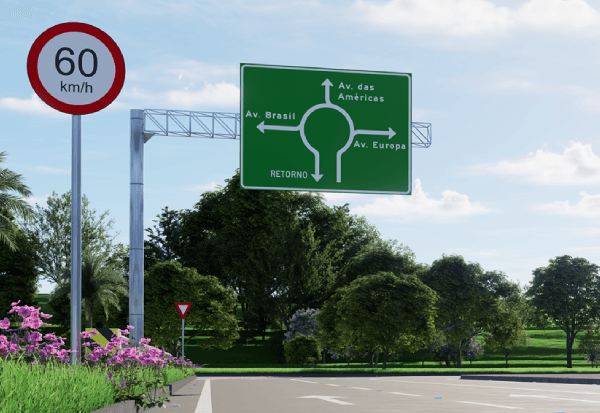
See how to create signage in a CAD environment in this Complete Guide, with Standards and Templates (2026)
In this content, you can download a free set of DWG blocks of directional signs for use in road signage projects, already based on the Brazilian Traffic Signage Manual — Volume III (CONTRAN).

You can also learn how to use and customize DWG blocks for signage, as well as discover a free way to create complete diagramming reports, through our video tutorial:
If you are developing a road signage project, in addition to downloading the free DWG blocks, it is essential to understand the function of the signs, their main types, and the regulatory requirements of CONTRAN (Brazilian National Traffic Council) to ensure clarity, legibility, and technical approval of the project.
This comprehensive guide brings together everything you need to work with these signs correctly and efficiently in your signage projects. Here you will find:
- What is directional signage and what standards should I follow to develop it?
- How to design signage and create its technical details?
- Types of vertical signage and practical examples.
- Main limitations of the manual process.
- How sinC transforms the layout of building plates in AutoCAD/Civil 3D.
What is directional signage and what standards should I follow to develop it?
Road signage is essential in virtually any road project and its main function is to guide drivers and pedestrians, providing information about destinations, distances, services, points of interest, and landmarks along the road. It is essential for traffic organization and safe navigation, especially in more complex urban and highway environments.
In Brazil, directional signage is regulated by Brazilian Traffic Sign Manual — Volume III, published by CONTRAN. This manual defines technical criteria such as colors, typography, dimensions, margins, arrows, pictograms and rules for the composition of license plates, ensuring standardization, legibility and regulatory compliance throughout the national territory.
For those starting a signage project, DWG blocks based on CONTRAN standards, such as those available for download at the beginning of this content, are an excellent starting point. They help speed up initial steps and facilitate the assembly of the most common directional signs in AutoCAD.
However, as the project grows in volume and complexity—requiring greater regulatory precision, layout variations, and productivity—the manual process begins to present limitations. For these demands, there is the option of using a specialized tool, such as... sinC, which automates the layout of road signs according to CONTRAN regulations and works natively within AutoCAD.

I'll talk more about this at the end of the content, but regardless of the tool adopted, it's essential to understand how the layout of the signage and the generation of its technical details work. Let's see this in practice below.
How to design signage and create its technical details?
There is also a free 100% option for those who wish to generate the technical layout details of traffic signs directly in their browser: the Traffic Sign website, available at:
🔗 https://nou.sinaldetransito.com.br/elenco-das-placas/
Once you've chosen one of the available sign types and entered the necessary information, the website generates a simple technical breakdown that can serve as a quick technical reference, a tool to check measurements, and even a deliverable for the end customer of your signage project.
Below is an example of how the website presents the diagrammed circuit board with its technical details:

This free resource is very helpful and an excellent complement to the block library available in this content, especially for those who are starting out or need to validate proportions before manually drawing in AutoCAD. In the video at the top of the material, we show some tips on how to use the site in the best way.

Types of vertical directional signage and practical examples.
The world of signs is larger than many imagine, especially when we enter the field of directional signs. Beyond the most basic types, such as those we showed how to diagram above (Educational, Distance Indicative, Municipal Boundaries, Pre-Signage, Kilometer Markers, etc.), you will frequently find in your signage projects a high demand for various other types of signs, such as:
Combined Warning and Regulation

In short, these are the Conventional signs from Volume I and Volume II of the CONTRAN Signage Manual., However, they are modified when it is necessary to supplement important information with banners, arrows, distances, or additional text.
Tourists

They are simply intended to guide the user to points of tourist, cultural and historical interest.
Auxiliary Services

They indicate the presence of services such as gas stations, hospitals, food establishments, repair shops, and similar facilities.
Indicators with a higher degree of complexity

These include multi-directional signs, combined destination signs, distance signs, or pre-signaling signs with more elaborate structures that require high regulatory precision.
All the plates shown above were developed from the sinC Plate Modeler. His ability to work with a wide variety of templates—maintaining proportions, margins, and text always within the CONTRAN standard—highlights how automation offers speed and precision that the manual method can hardly match.
This difference becomes even more evident when we analyze the main limitations of the manual process.
Main limitations of the manual process
We know that simply designing a pretty sign isn't enough: it's the accuracy in size, font, margins, arrows, and colors that guarantees approval from public agencies and avoids rework. All this rigor is described in... CONTRAN's Traffic Signage Manuals, especially Volume III.
The challenge is to fine-tune every detail, even more so when there are changes in legislation or when the project requires dozens of different license plates… That being said:
Precision is not a luxury: it's a requirement for project approval.
Although there are free options that help with the initial stages, and many professionals resort to tools like CorelDRAW, Paint, Revit, and other improvised solutions, we know that none of them were specifically designed for designing signage.
This inevitably leads to problems such as:
- Delay in creating multiple license plates
- Difficulty in assembling composite boards
- Lack of regulatory validation
- 3D production is unfeasible or extremely laborious.
And this is where the tool we mentioned earlier comes in: sinC, an AutoCAD-compatible plugin that, unlike the tools mentioned above, was developed exclusively to meet the technical requirements of road signage, allowing maximum productivity in the creation of 2D and 3D DWG models, as well as extreme precision in diagramming and generating technical details.
How does sinC transform the layout of license plates in AutoCAD/Civil3D?
Inside the sinC, There is a unique feature called the License Plate Modeler, developed specifically to automate the creation of road signs in accordance with CONTRAN regulations. You can "see for yourself" how this feature optimizes the sign creation process, from basic design and use in 2D and 3D projects to technical detailing.
sinC is currently the most widely used road signage software in Brazil, adopted by independent designers, large consulting firms, multinational companies, universities, and even recommended by public agencies in technical procedures. This is because it is currently the most complete, accurate, and CONTRAN-compliant solution for those working with vertical and horizontal signage.
Unlike generic tools — or the improvised use of graphic software — sinC was designed exclusively to meet the needs of road signage projects. And that's precisely why it can automate tasks that, manually, would be slow, repetitive, and prone to errors.
Among its most important distinguishing features are:
✔ Automated 100% sizing (unique in the country)
The sinC Sign Modeler generates road signs with margins, text, spacing, and pictogram and hexagon proportions exactly as per CONTRAN regulations, according to road type and speed, eliminating manual adjustments. This ensures technical accuracy and drastically reduces production time.
✔ Creation of signs for national and international scenarios (unique in the country)
While other solutions are limited to the Brazilian standard, sinC allows working with international standards and layouts, making it the only national tool capable of serving both local and global projects.

✔ Automatic generation of native 2D and 3D DWG files (unique in the country)
Because it's a native AutoCAD tool, the sinC Plate Modeler works natively in DWG format. With just a few clicks, sinC creates two-dimensional and three-dimensional versions of the plates, something that, using the manual method, would require lengthy extrusion, adjustment, and review steps.
✔ Plate Modeler included in the plugin
The layout module isn't separate; it's already integrated into sinC. This means that, in addition to all the functionalities of a complete signage system, you also gain a powerful tool for creating and editing directional signs.
✔ Automated generation of technical details in DWG or PDF format.
After the automated application of the sizing of your panels, you can still export dwg or pdf versions of the technical detail containing your diagrammed panel. Dimensions, corner details, text, and symbols are included in this document.

✔ Complete productivity for your project
In addition to layout design, sinC also delivers other essential features, such as:
- Automation for other signage disciplines such as: lanes, legends, traffic lights and roadworks.
- Instant quantification of the entire project.
- Potential for adaptation to BIM methodology.
✔ Best value for money on the market
While paid alternatives offer only isolated functions — and free tools only cover initial steps — sinC brings everything together in a single environment, ensuring speed, accuracy, and standardization. In practice, it replaces several tools and reduces time, rework, and production costs.
Frequently Asked Questions
How to create directional signs in AutoCAD?
The manual method requires setting margins, fonts, frames, and proportions according to the Signage Manual Volume III. You can use our free DWG blocks and the detailing website indicated in this guide to validate proportions.
For large-scale production, the sinC Plate Modeler automates the entire standardization process.
Are there free DWG blocks of CONTRAN road signs available?
Yes. Within this content, we provide a package of 2D and 3D blocks, already structured to facilitate the assembly of the most common road signs in road projects. They serve as a starting point and can be used in any version of AutoCAD from 2014 onwards.
Is it possible to create 3D signage directly in AutoCAD?
Yes, but doing it manually can be time-consuming: it involves extrusion, depth adjustments, layers, and visual reviews.
sinC automatically generates 2D and 3D versions of the panels in native DWG format, eliminating the need for manual modeling.
What is the best tool for designing road signs according to CONTRAN regulations?
For small projects, DWG blocks and the detailing website are sufficient. For professional demands, especially when the project requires dozens or hundreds of panels, normative precision, and integration with AutoCAD, sinC is the most complete solution on the market, with automatic dimensioning and native 2D and 3D generation.
Does sinC really replace the manual layout process?
Yes. The sinC Sign Modeler eliminates tasks that previously took hours, such as adjusting margins, fonts, arrows, pictograms, and proportions. Furthermore, it validates the sign according to CONTRAN regulations, generates native DWG files, and integrates everything with the rest of the signage project.
Want to further improve your projects? Check out other free downloadable materials that may be useful for your projects:
Pedestrian crossing in DWG format – Download for free
3D Blocks for Vertical Signage in BIM | Free Download
We hope these materials can be useful in your routine as a road sign designer.
See you later,