

Free Download | All 3D Regulatory and Warning Signs to be used in your BIM Road Signage projects
We created this content to help you download 3D blocks for free. vertical signage and use in the development of your BIM projects.
Do you know what BIM is and what its advantages are?
Building Information Modeling (BIM) is a technology that allows... “Digital representation of the physical and functional characteristics of a building, which contains all information about the building’s life cycle, available in the project.”

I.e, It is a virtual construction equivalent to a real one, Rich in detail, BIM guarantees you, the designer, an early understanding of potential interferences and common maintenance situations throughout the project's lifecycle, reducing the chances of improvisation and the time spent on construction. Therefore, BIM improves your performance as a designer and ensures that the planned schedule and budget are met.
The application of BIM in road signage projects offers several advantages, such as:
- Visualization of elements in 3D;
- Collaboration between different disciplines;
- Project life cycle management;
- Early detection of conflicts and design problems;
- Budgeting and planning.
Therefore, with the aim of helping you, the designer who already needs to deliver your BIM signage projects, we developed this amazing material. In it, We provide a complete library of regulatory and warning signs in DWG format, all in 3D, to be used in your BIM signage projects. Do the free download at the beginning of this content and start using it in your projects.
In addition to the 3D block library, it is important to highlight that the sinC It offers a complete solution for road signage projects in BIM. The platform includes not only 3D vertical signage, but also horizontal signage, traffic lights, and complementary infrastructure elements such as guardrails, barriers, and terminals, allowing the entire project to be developed in an integrated, standardized way, and compatible with the requirements of regulatory bodies.
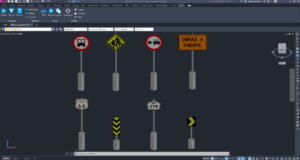
Regulatory Vertical Signage
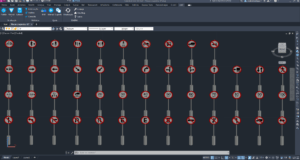
Regulatory vertical signage is classified according to its function to regulate the obligations, restrictions, prohibitions or constraints governing the use of the road. More information about its use and dimensioning can be found in Vertical Signaling Manual CONTRAN Regulation!
See below an example of our file with all the 3D regulatory plate blocks in DWG format:
Vertical Warning Signs
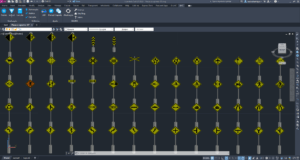
Vertical warning signs are classified according to their function to alert the driver to potentially dangerous conditions on or near the road, such as schools and pedestrian crossings. More information about their use and size can be found in CONTRAN Vertical Warning Signage Manual!
See below an example of our file with all the 3D warning sign blocks in DWG format:
Vertical Indication Signage
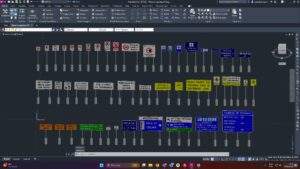
We know that this is the category with the widest range of signs, which makes them very difficult to produce manually. With that in mind, we are also making available some directional signs used in urban and highway sections.
See below an example of our file with all the 3D sign blocks in DWG format:
To develop the specific signage for your project, our best option is to recommend... sinC which stands out for having the only Circuit Board Modeler on the market that generates circuit boards directly in 3D., Ready for use in BIM projects. With this tool (exclusive in the market), the designer can create, diagram, and update signage automatically, eliminating the need for external software and ensuring full compatibility with the project's BIM model.
This approach is already widely adopted by multinational companies and is a benchmark for projects in Brazil, such as... TPF e Egis, and is aligned with the technical practices and requirements of road authorities such as DER e DNIT.
Feel free to tell us what you think of our content and if you have any other material we can provide to help! We're always here, okay?!
Frequently Asked Questions
How to create 3D vertical signage?
Creating 3D vertical signage can be done directly in CAD software, but this manual process is usually time-consuming and prone to inconsistencies in standards. The most efficient way is to use pre-structured BIM libraries, which allow you to insert 3D signs with correct dimensions, proportions, and technical information, ensuring greater standardization, speed, and compatibility with BIM projects.
How to create 3D road signs in AutoCAD?
3D signage can also be modeled in AutoCAD, but this manual process requires even more time and advanced modeling knowledge. A much more productive alternative is the use of specialized tools, such as... sinC Plate Modeler, which allows you to create, diagram, and generate signage directly in 3D, ready for use in BIM projects, eliminating the need for external software.
How to develop a road signage project in BIM?
A road signage project in BIM goes far beyond the simple use of 3D blocks. It involves the integration of vertical, horizontal, traffic light, and complementary works signage into an informational model compatible with other project disciplines. For this, the use of specialized solutions such as... sinC It facilitates the transition from 2D to BIM, automates repetitive tasks, and ensures greater control and quality of information throughout the entire project lifecycle.
See you later,


