BIM… Could these three little letters change (almost) everything we know about our signage projects?
To start off short and sweet, the answer is yes. If you’ve heard about the subject “BIM projects for road signs” and are desperate to understand what it’s all about, welcome to the club! I felt exactly the same way when I started researching this.
The fact is that this acronym is dominating engineering today, but many of us, road sign designers, still have doubts about what will really change in our daily lives with the implementation of this new methodology.
Whether you understand it or not, believe me:
Just as CAD replaced drawing boards, BIM will certainly replace / is already replacing CAD platforms!
With this in mind, we have prepared a series of content (3 in total) with the aim of clearing up any doubts you may have regarding the subject of BIM with a focus on signage projects.
Between blog posts, like this one, and videos on YouTube, we're going to demystify these three little letters that have been haunting a lot of people out there... The episodes of this series (coming soon to Netflix) will be:
- 1 – What is BIM? What changes in signage projects? [This one]
- 2 – What software should I use? [Released soon]
- 3 – Developing a real signage project in BIM [Released soon]
The idea is to be didactic, practical, show real application cases, and in addition, we will also provide a free library with 3D road signage blocks throughout the episodes so that you can start designing in BIM.
So… Grab the popcorn and press play:
What is BIM? What changes in signage?
I will leave here at the beginning the video of EP.1 – What is BIM / what changes in road signage… Feel free to consume this content via video, or by reading the rest of this text on the blog.
Just don't give up, okay?! Especially because in this first episode we talked about the federal government decree that “requires” the use of BIM in federal projects from 2021 onwards, including our esteemed DNIT... Wow... Check it out:
If you chose to continue here, I'll get straight to the point with the main question that appears:
The first thing you should know is that BIM no is a software.
Many people get confused, when in fact BIM is a work methodology that inevitably involves the use of specific software such as Infraworks, Navisworks, sinC, among others that I will show in a little more detail later.
From the moment you develop your project in BIM software, it becomes a digital representation of the physical and functional characteristics of your businessDid you understand, or are you lost?

Don't worry, we'll make it simple for you.
In the figure below, on the left side we have a 2D project made in CAD, and on the right side this same 2D model was automatically transformed into a BIM project by sinC software.
Can you notice the difference? Of course, right?
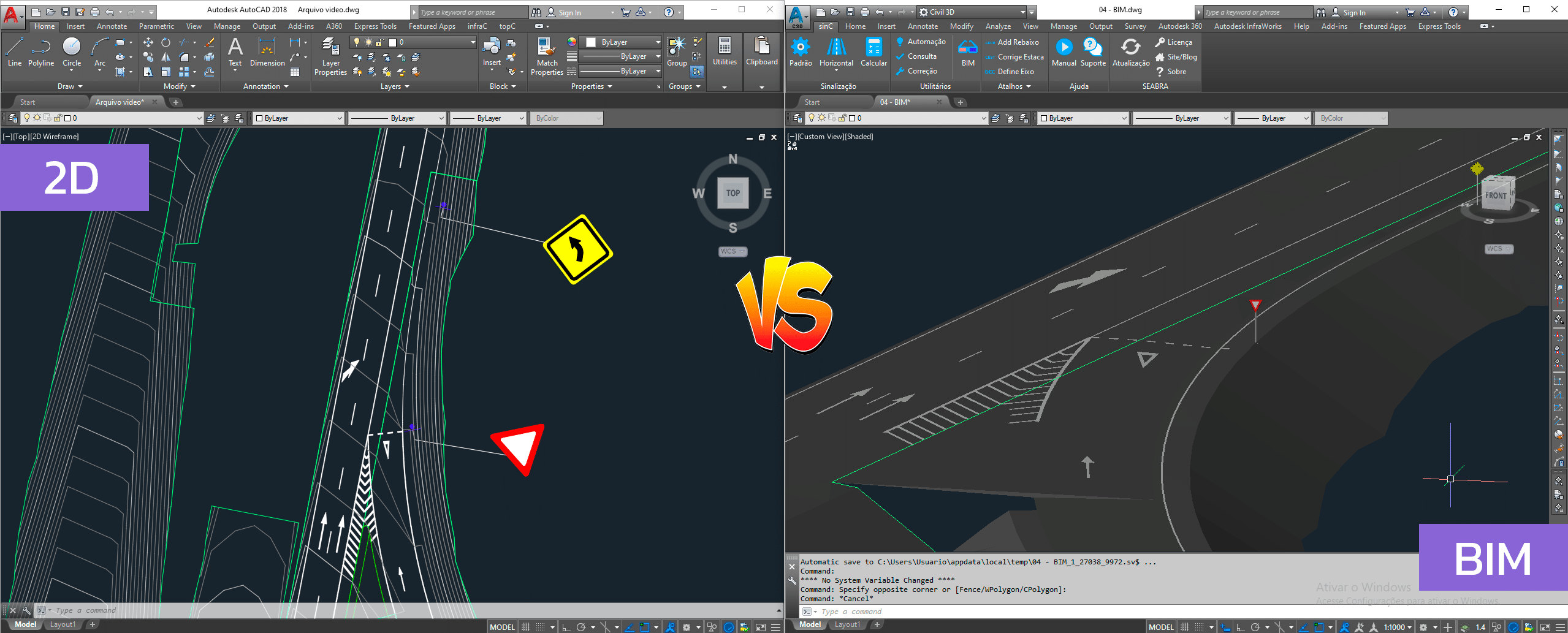
But don't be fooled into thinking that 3D representation alone is enough.
What actually makes a project “officially” in BIM is (in addition to the representation of all the elements in 3D) the fact that when we select any element within our BIM software, it brings up the list of all the construction information for that item.
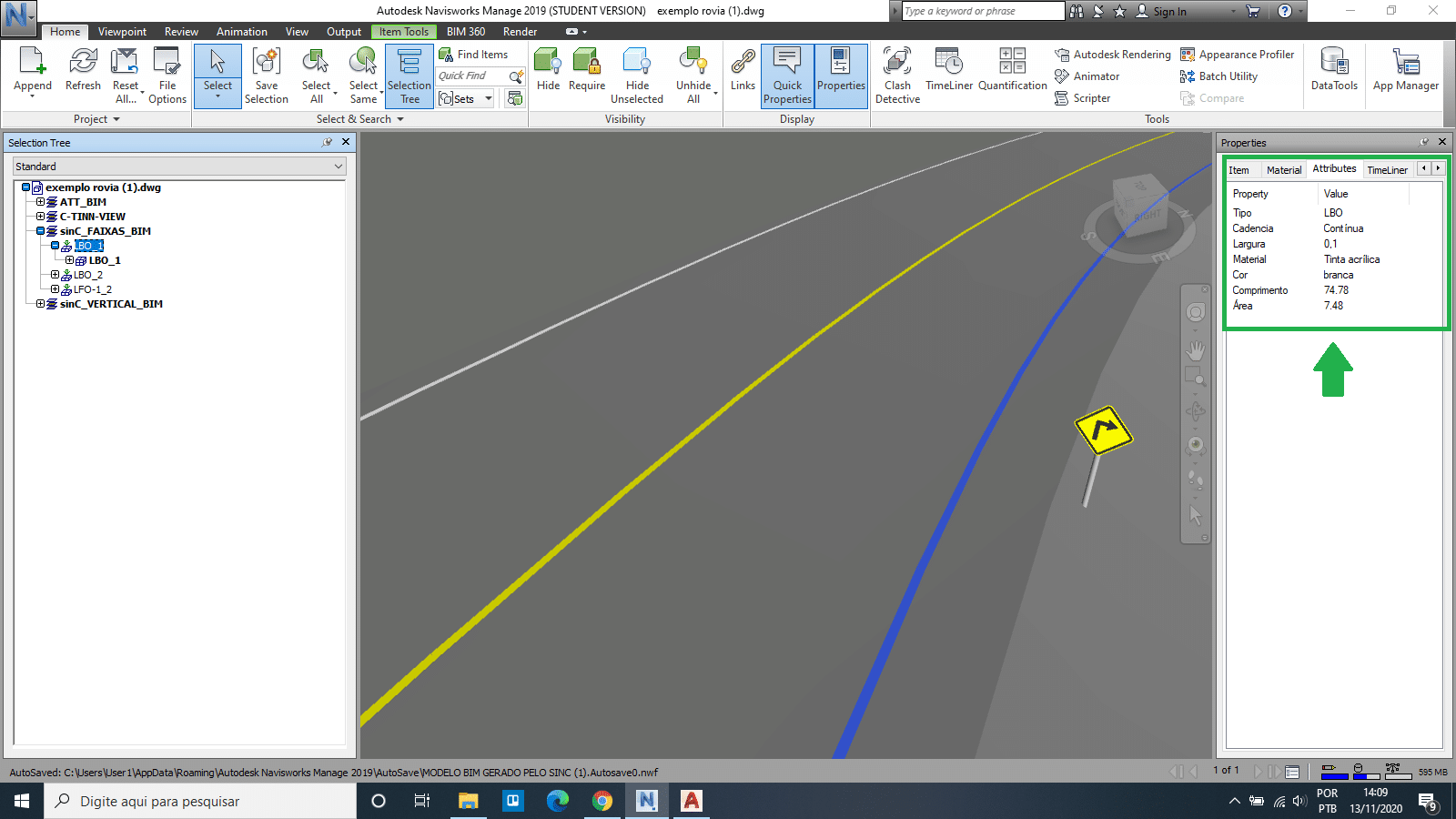
For example, when we click on the LBO item we will have an element containing all its physical characteristics, such as the type of paint, length, area, among others.
See this example below where, in the Navisworks software, with a BIM signage model also generated by sinC, I select an LBO type track inserted in my project… Look at the information about it in the right side tab:
Therefore, from now on, speaking specifically about the day-to-day work of the designer, you can now identify and understand what a BIM signage project should be like with two simple questions:
1) Are the elements represented in 3D at real size?
2) Do they have the appropriate construction specifications linked to them?
If the answer is YES to both questions, we have a project whose physical and functional characteristics are represented there, therefore, we have a BIM project.
Now it's easy, huh?!
Okay, ok… But what’s the purpose of this?
It turns out that both these features and the 3D visualization allow us to have an immensely better visualization of the final result of the project. In other words:
- Allows you to quickly and accurately quantify all the materials used in the construction of your project;
- Allows for various analyses and improvements that can be applied before the construction stage;
- There are huge savings in time and money.
“Wow, this is so good!” Yes, so much so that there are rumors out there that the use of this type of technology in BIM for the development of projects (including road signage) will be mandatory… wow… really?
Is it true that the federal government decreed that projects must be delivered in BIM from 2021 onwards?
“Yes. That note is (really) true.”
If you are still in doubt about whether or not you should start learning about this new method, I will give you a great incentive:
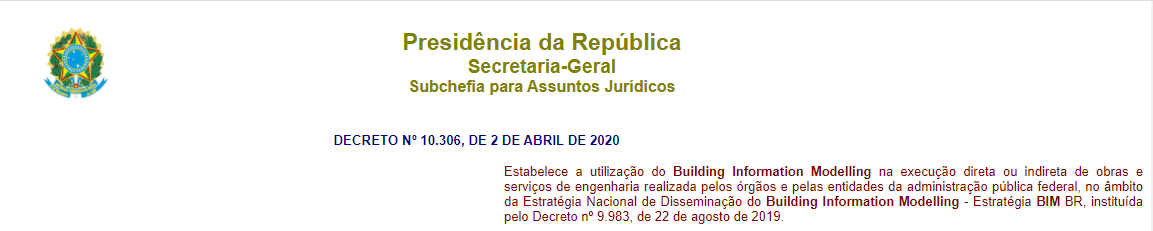
The federal government launched a decree in April 2020, establishing the use of BIM in the direct or indirect execution of engineering services performed or administered by federal agencies. And one of these agencies mentioned in the decree is DNIT.
In other words, soon practically any company will be demanding that infrastructure projects, including our beloved road signs, be delivered strictly in BIM.
But calm down, there’s no need to be scared…
The decree specifies that implementation will happen gradually, meaning this is our best opportunity to master this technology before it actually becomes mandatory.
And we are here to help you in this process so that you can migrate from CAD platforms to BIM without “too much pain”.
So, now that you have completed EP1 of this series and understand what BIM is and how this methodology will impact your day-to-day life, what is stopping you from binge-watching the remaining episodes?
See you there:
EP2. What are the most used software? [Released soon]
EP3. Making a real signage project in BIM [Released soon]
Do you still have any questions? Tell us what content you would like to see on the blog.
See you soon!